Essential Virtual Assistant Tools, Software & Platforms in 2025
31 Jul 2024 By: Mary Dellosa
Updated
Being a successful virtual assistant requires mastering the right tools to manage tasks, communicate with clients, and stay organized. This guide explores essential virtual assistant tools, software, and platforms for 2025, including basic VA tools every assistant should know. We also provide tips on how to choose the right tools for your workflow, helping you work efficiently and deliver exceptional service.
Virtual assistants must manage various responsibilities, from administrative support to specialized tasks like social media management or customer service. The right tools help streamline these duties, improving productivity and communication. We’ll look at how project management, time tracking, communication, and file-sharing tools contribute to efficient workflows. Additionally, we’ll guide you on evaluating tools based on factors like task complexity, team size, and integration with existing systems, ensuring you pick the best solutions for your virtual assistant business.
What Does Virtual Assistant Do?
A virtual assistant offers administrative, creative, or technical help remotely. They work from their own offices, using their own tools and equipment, to assist clients with tasks. From managing emails and appointments to conducting research and creating reports, virtual assistants support businesses and individuals.
Virtual assistants act as a right hand to clients, handling tasks that free up valuable time and allow focus on core activities. They adapt to each client’s needs, providing personalized support to boost productivity and efficiency.
Key Responsibilities of a Virtual Assistant
VAs wear many hats to help businesses run smoothly. Their responsibilities often include:
- Admin Tasks: Scheduling, organizing files, doing research, preparing presentations, and handling correspondence.
- Digital Support: Managing social media, updating websites, and handling customer service inquiries.
- Inbox Management: Filtering emails, replying on your behalf, and keeping communication organized.
- Bookkeeping Basics: Sending invoices, tracking expenses, and creating financial reports. (Yes, even using Google Sheets for invoicing!)
Support for Contractors
Contractors often rely on VAs to manage the business side of things:
- Financial Admin: Creating estimates, processing invoices, and tracking payments.
- Tools like Joist: Designed specifically for contractors, Joist makes it easy for VAs to manage finances all in one place—streamlining workflows and reducing errors.
Content, E-commerce & More
Beyond admin and finances, VAs are also pros at:
- Content Creation: Writing blog posts, uploading content, and maintaining publishing schedules.
- E-commerce Management: Overseeing online stores, updating product listings, and handling customer questions.
- Adapting Fast: Their ability to pick up new tools makes them incredibly versatile—ready to jump into any task you need.
In short, virtual assistants bring flexibility, efficiency, and peace of mind to busy teams.
Skills Required for a Virtual Assistant
To stand out as a VA, focus on the essentials:
- Stay Organized: Good time management and attention to detail go a long way.
- Communicate Clearly: Whether it’s via email, chat, or video calls, clear communication is key.
- Be Tech-Savvy: Comfort with tools and platforms is a must.
- Work Independently: Be self-motivated, reliable, and able to meet deadlines without constant supervision.
Skills That Set You Apart
- Adaptability: Juggle tasks and shift priorities as client needs change.
- Problem-Solving: Tackle issues on your own without waiting for instructions.
- Proactivity: Anticipate client needs and take initiative.
Build Your Skill Set
Start with the basics, then level up:
- Core Admin Skills: Data entry, managing calendars, and handling emails.
- Specialized Expertise: Skills like social media management, bookkeeping, or customer support add extra value.
- Keep Learning: Staying up to date with tools and trends helps you stay competitive.
Why are Virtual Assistant Tools Important?
The right tools make a VA’s job smoother, faster, and more organized. They help with:
- Task Management: Keep track of multiple projects, deadlines, and priorities.
- Time Tracking: Ensure accurate billing and better productivity insights.
- Communication: Stay connected with clients and teams in real time.
- File Sharing: Collaborate on documents easily and securely.
- Scheduling: Simplify meetings and eliminate back-and-forth emails.
Enhancing Productivity with Tools
1. Task & Project Management
Stay organized and manage multiple clients with:
- Trello, Asana, Monday.com – Easy-to-use boards and task lists
- ClickUp, Todoist – Advanced features like Gantt charts, Kanban boards, and app integrations
2. Time Tracking & Productivity
Stay efficient and bill accurately:
- Toggl, My Hours, Harvest – Track work hours and tasks
- RescueTime – Analyze productivity patterns and improve focus
3. Communication & Collaboration
Keep communication flowing:
- Slack, Zoom, Google Meet, Microsoft Teams – Real-time messaging, video calls, and file sharing
- Google Drive, Dropbox – Store and collaborate on documents securely
4. Scheduling & Client Management
Look professional and save time:
- Calendly, Acuity Scheduling – Let clients book meetings without email ping-pong
Virtual assistant tools aren’t just helpful but essential. They boost efficiency, reduce stress, and ensure top-notch service delivery. With the right tech stack, VAs can stay on top of their workload, meet client expectations, and grow their business with confidence.
Tools for VA: Must-Have Apps and Software

Task Management Tools for Virtual Assistants
Task management tools help virtual assistants stay organized and efficient. They let you set priorities and collaborate easily. Trello, Asana, and Monday.com are popular because they are simple and customizable.
With Trello, virtual assistants create boards for projects, add tasks, and set due dates. They can track progress and collaborate by adding comments and attachments. Asana offers a detailed approach. Virtual assistants can create projects, break them into tasks, and assign them to team members. It also provides a timeline view to see deadlines and dependencies. Monday.com has an intuitive interface and customizable workflows. Virtual assistants can create tailored boards and automate repetitive tasks, saving time and effort.
Additionally, ClickUp combines task management, document collaboration, and time tracking in one platform. It allows virtual assistants to view tasks in multiple formats, such as lists, boards, or Gantt charts, making it versatile for various projects. Notion is another option, offering an all-in-one workspace for task management, note-taking, and team collaboration, perfect for organizing both personal and client projects. These tools help streamline work and keep virtual assistants on top of their responsibilities.
Communication Tools
Effective communication is key for virtual assistants to work well with clients and team members. Slack, Microsoft Teams, and Google Meet are great for instant messaging, video calls, and document sharing. Incorporating a virtual chat assistant can further streamline communication, offering quick responses and improving client satisfaction.
Slack lets virtual assistants chat quickly with clients and team members. It integrates with tools like Trello, Google Drive, and Zoom, making file sharing and collaboration seamless. Slack’s channels help organize conversations by topic, keeping projects focused and reducing clutter in communications.
Microsoft Teams combines chat, video meetings, and file sharing in one place, making it an all-in-one platform for collaboration. Virtual assistants can create channels for different projects or clients, making it easier to stay organized. It integrates with Microsoft Office apps like Word and Excel, streamlining document sharing and editing during meetings. if you use Microsoft Teams an AI note taker for Teams can further enhance productivity by recording discussions, summarizing key points, and sharing notes with all participants.
Google Meet provides high-quality video calls and screen sharing, essential for client updates and team discussions. Its easy scheduling through Google Calendar allows quick setup of virtual meetings, while its integration with Google Drive makes sharing documents and presentations during calls simple.
These communication tools ensure virtual assistants can maintain clear, organized, and timely communication, which is critical for smooth project management and strong client relationships.
File Sharing and Collaboration Tools
Virtual assistants need easy, secure ways to share and work on files. Google Drive, Dropbox, and OneDrive are great for this, making collaboration simple and safe.
Google Drive lets VAs store and share files effortlessly. It works with Google Docs, Sheets, and Slides, so both assistants and clients can work on documents at the same time. Dropbox allows quick file sharing and keeps backups of past versions, adding an extra layer of security. Its Smart Sync feature saves space by letting you access files without downloading them.
OneDrive, part of Microsoft 365, also offers secure storage and sharing. It works with Microsoft Office apps like Word and Excel, making it easy to collaborate. You can even work offline, so you’re productive without an internet connection.
QuickBooks data migration allows businesses to seamlessly transfer their financial information from other systems, ensuring continuity and accuracy. This process helps virtual assistants efficiently manage finances without losing any crucial data during the transition.” after this “Google Calendar syncs across devices and integrates with scheduling tools like Calendly, streamlining meeting setups and keeping appointments organized. These tools make file sharing and teamwork easy, so VAs and their clients can work together smoothly, no matter where they are.
Time Tracking Tools
Tracking time is crucial for virtual assistants to stay productive, bill accurately, and find areas to improve. Popular tools for this are Harvest, Toggl, and RescueTime.
Harvest offers a simple way for virtual assistants to track time. They can start and stop timers for tasks, add notes, and categorize entries. It also provides reports to analyze time use. Toggl focuses on ease of use. Virtual assistants can track time with one click, and it provides detailed reports and visualizations. RescueTime automatically tracks time spent on websites and apps, helping virtual assistants understand their digital habits and make better productivity choices.
Additionally, tools like Clockify allow teams to track billable hours across multiple projects. It’s useful for invoicing and monitoring team productivity. Time Doctor combines time tracking with screenshots and activity monitoring, making it ideal for client transparency and accountability. These tools not only improve time management but also provide insights into optimizing workflows and boosting efficiency.
Project Management Tools
Virtual assistants handling complex projects benefit from tools for task delegation, progress tracking, and resource management. Popular choices are Basecamp, Wrike, and Teamwork.
Basecamp is a simple platform for project management. Virtual assistants can create projects, assign tasks, and communicate with clients and team members easily. Wrike offers more advanced features. Assistants can create custom workflows, track progress with Gantt charts, and manage resources well. Teamwork provides a full suite of tools. It includes task management, time tracking, and document collaboration, helping virtual assistants streamline their work and execute projects efficiently. To further improve workflows, virtual assistants can integrate tools like Jira issue templates to streamline task creation and maintain a structured approach to project tracking and resolution.
VA Tools List: Complete Resource Guide
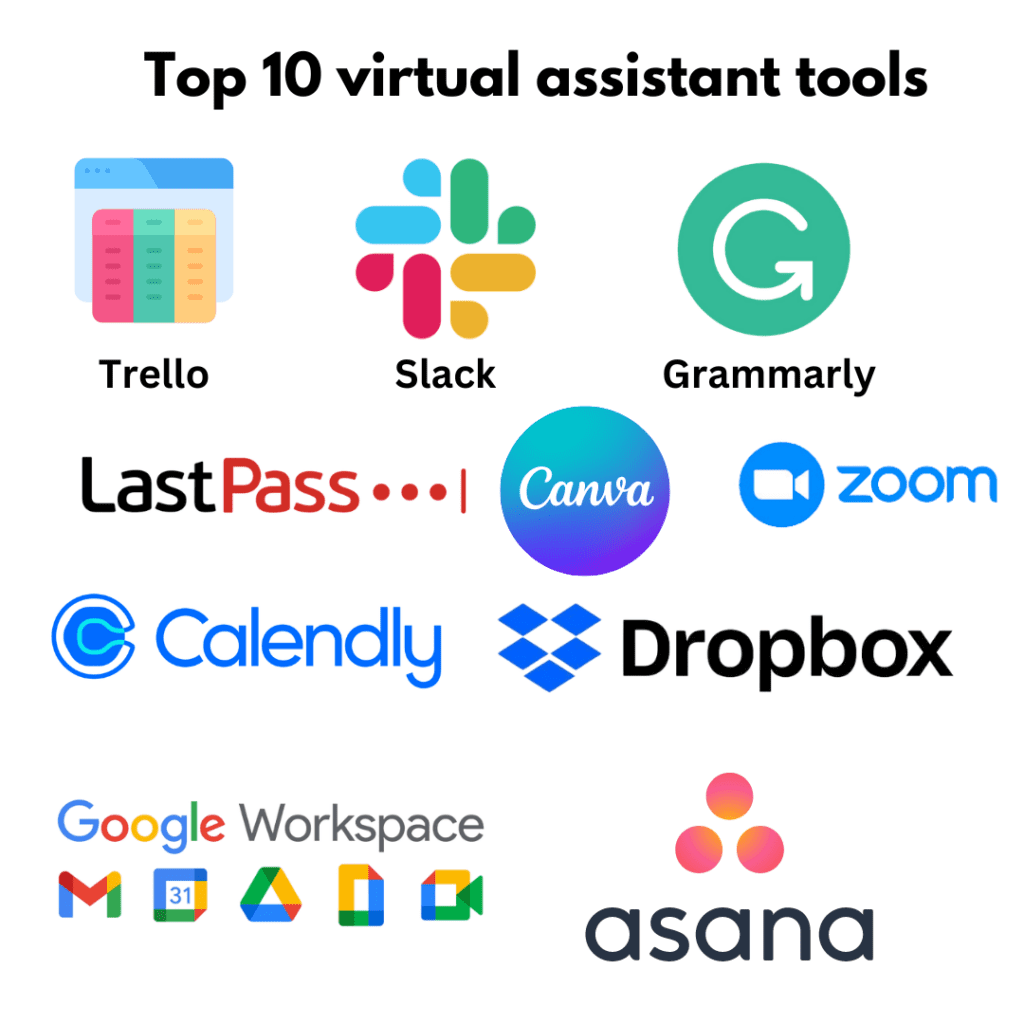
- Trello – Organize tasks and projects with boards, lists, and cards. Trello offers visual organization, letting you easily track progress and set priorities. You can also add labels, due dates, and attachments for better task management.
- Slack – Communicate with clients and teams in real-time. Slack supports channels for specific topics, direct messaging, and integrations with other apps like Google Drive, making collaboration seamless and centralized.
- Google Workspace – Access email, documents, and calendars seamlessly. Google Workspace includes Gmail, Google Docs, Sheets, and Drive, enabling easy file sharing, real-time collaboration, and efficient email communication within one platform.
- Zoom – Hold virtual meetings and video conferences. Zoom allows video calls, screen sharing, and recording features. It’s ideal for virtual assistants managing remote meetings with clients and teams worldwide.
- LastPass – Manage and securely store passwords. LastPass stores all your passwords in one place and auto-fills them for you. Its strong encryption ensures secure access to all your accounts without worrying about remembering multiple passwords.
- Asana – Track projects, deadlines, and team tasks. Asana lets you break down projects into tasks, assign them to team members, set priorities, and track progress through lists, calendars, or timelines, ensuring deadlines are met.
- Canva – Create graphics, social media posts, and presentations easily. Canva provides customizable templates for everything from logos to infographics, allowing virtual assistants to create professional designs quickly without graphic design experience.
- Calendly – Schedule meetings without back-and-forth emails. Calendly syncs with your calendar, allowing clients to book available slots. It automatically adjusts for time zones, sends reminders, and prevents scheduling conflicts.
- Dropbox – Store and share large files with clients. Dropbox offers cloud storage for securely storing and sharing files with clients. It allows file versioning and easy access from any device, ensuring smooth collaboration.
- Grammarly – Ensure clear, error-free writing in emails and documents. Grammarly checks for spelling, grammar, and style issues. It also suggests improvements, helping virtual assistants maintain professionalism and clarity in written communication.
These tools boost productivity, organization, and communication for virtual assistants.
Trending Now
Virtual assistant software helps VAs and businesses streamline tasks, manage projects, and improve communication. Tools like ClickUp, Slack, Zoom, QuickBooks, Google Calendar, and others enhance productivity by offering project management, team collaboration, video conferencing, accounting, and scheduling features.
These tools improve efficiency by automating repetitive tasks, boosting team communication, and offering easy ways to manage multiple projects and clients.
Choosing the Right Tools for Your Needs
Choosing the right tools for virtual assistant work is key. To decide, look at your business needs. Consider task complexity, team collaboration, and budget.
When evaluating your needs, examine your daily operations closely. Think about current tasks and future needs as your business grows. Choosing tools that scale and adapt can save you time and resources later.
Assessing Your Business Requirements
Start by looking at your main tasks and activities. Figure out which tools will help you work better. Think about your team size, how much work you handle, and how much collaboration is needed. Identify any frustrations or roadblocks in your current processes. Look for tools that can fix these issues, like automating tasks or improving communication.
Also, keep your budget and future growth in mind. Pick tools that fit your needs now but can grow with your business. Make sure they work well with any systems you already use to avoid disruptions. Focus on tools that are easy to use, so you and your team can get started without a steep learning curve.
Consider your business goals and how the right tools can help you reach them. If you work with remote teams, prioritize tools that make communication and file sharing easier. If customer service is key, look for ways to simplify client interactions. Try out tools before fully committing to make sure they suit your workflow. Aim for tools that save time and simplify your work, not make it more complicated.
Comparing Different Tool Options
Research and compare tool options by looking at features, ease of use, integration, and reviews. Use free trials to test tools and see if they meet your needs before subscribing. Ask other virtual assistants or industry pros for tool recommendations. Their insights can help you choose the right tools based on real-world experiences.
The Best Tools for Virtual Assistants (By Specialization)
The right tools don’t just help you work faster, they help you work smarter, communicate better, and deliver results that keep clients coming back. Here’s a breakdown of top platforms by VA type, along with tips on getting the most out of each one.
Admin / General VA
These tools keep your daily operations running smoothly — from task tracking to client communication.
| Tool | Best For | Pricing | Productivity Hack |
|---|---|---|---|
| Notion | Docs, task management, SOPs | Free / $10/mo (Plus) | Build a client onboarding template once, duplicate it for every new client. |
| Google Workspace | Email, Calendar, Drive, Docs | From $6/user/mo | Use Google Calendar’s “appointment slots” feature to let clients self-schedule. |
| Trello | Simple task boards | Free / $5/mo (Standard) | Use Butler automation to move cards and send deadline reminders automatically. |
| Clockify | Time tracking and invoicing | Free / $3.99/mo (Basic) | Tag tasks by client to generate instant monthly billing reports. |
How to choose: If you manage multiple clients at once, Notion gives you the most flexibility. If your clients are already on Google Workspace, staying in that ecosystem reduces friction.
Social Media VA
These platforms help you plan, create, schedule, and analyze content across channels.
| Tool | Best For | Pricing | Productivity Hack |
|---|---|---|---|
| Buffer | Scheduling across platforms | Free (3 channels) / $6/channel/mo | Use the “Ideas” feature to stockpile content drafts between posting sessions. |
| Canva | Graphics and branded content | Free / $14.99/mo (Pro) | Set up brand kits for each client so every graphic is on-brand without re-uploading assets. |
| Later | Visual Instagram planning | Free / $16.50/mo (Starter) | Use the Linkin.bio feature to turn your client’s Instagram feed into a clickable landing page. |
| Metricool | Scheduling + analytics | Free / $18/mo (Starter) | Run weekly performance reports in under 5 minutes using Metricool’s automated report builder. |
How to choose: If your clients are heavy on Instagram or TikTok, Later’s visual calendar wins. For multi-platform management with analytics in one place, Metricool is the stronger pick.
Customer Support VA
Tools built for handling tickets, live chat, and inbox management at scale.
| Tool | Best For | Pricing | Productivity Hack |
|---|---|---|---|
| Freshdesk | Ticket management | Free (up to 10 agents) / $15/agent/mo | Use canned responses for your top 10 most common inquiries to cut reply time in half. |
| Gorgias | Shopify-integrated support | From $10/mo (50 tickets) | Connect Gorgias to your client’s Shopify store to pull order data directly into every ticket. |
| Tidio | Live chat + chatbots | Free / $19/mo (Starter) | Set up a Tidio chatbot flow to handle FAQs overnight — your client’s inbox stays clean by morning. |
| Zendesk | Enterprise-level support | From $19/agent/mo | Use macros (templated responses + actions) to close repetitive tickets in one click. |
How to choose: For ecommerce clients on Shopify, Gorgias is purpose-built and worth the cost. For everything else, Freshdesk’s free tier is one of the most generous starting points available.
Tech / Systems VA
These tools help you automate workflows, integrate apps, and build systems that run without constant oversight.
| Tool | Best For | Pricing | Productivity Hack |
|---|---|---|---|
| Zapier | No-code app automation | Free (100 tasks/mo) / $19.99/mo (Starter) | Build a lead capture Zap: form submission triggers a CRM entry, a welcome email, and a Slack notification — all without touching a single app. |
| Make (formerly Integromat) | Complex multi-step workflows | Free (1,000 ops/mo) / $9/mo (Core) | Use Make’s router module to split a single trigger into multiple parallel workflows. |
| Airtable | Structured databases for clients | Free / $10/user/mo (Plus) | Use Airtable’s interface designer to build a clean client-facing portal without writing any code. |
| ClickUp | All-in-one PM + docs | Free / $7/user/mo (Unlimited) | Turn any task into a recurring task with custom intervals — never manually re-create monthly deliverables again. |
How to choose: If your work involves connecting apps together, start with Zapier for simplicity. When workflows get more complex (branching logic, filters, data transformation), Make gives you more control for less money.
Quick Tip: Stack Your Tools Wisely
You don’t need every tool on this list. A tight stack of 3 to 4 tools that work well together will outperform a sprawling setup every time. A practical starting combination for most VAs: Notion + Google Workspace + Clockify for general admin, with one specialty tool added based on your niche.
Conclusion
In conclusion, virtual assistants need essential tools to boost productivity, improve communication, and manage tasks. By knowing their role, understanding key responsibilities and skills, and choosing the right tools, they can work efficiently and provide top support to clients.
To help you get started, download our Virtual Assistant Toolbox, a practical guide packed with insights, tool recommendations, and strategies to streamline your workflow and elevate your performance as a VA.
Ready to boost your productivity? HelpSquad BPO offers professional virtual assistants and 24/7 customer service for your admin, back-office, and research needs. Our bilingual agents start at $8.50 per hour, keeping your business running smoothly all day. Focus on growing your business. Start your trial today and see the HelpSquad difference!
FAQ’s
What are the basic VA tools every virtual assistant needs?
Every VA needs tools covering five core areas: communication, project management, file storage, time tracking, and invoicing. Think Slack, Trello, Google Drive, Toggl, and PayPal or Wave as a solid starter stack.
Which virtual assistant software is most essential in 2025?
Google Workspace remains the backbone for most VAs. Beyond that, Notion for organization, Slack for client communication, and Zoom for calls cover the majority of daily needs.
What are the best virtual assistant platforms for freelancers?
For finding work and managing clients: Upwork, Fiverr, and Toptal. For running your business: HoneyBook or Dubsado handle contracts, invoices, and onboarding in one place.
Which tools do virtual assistants use for communication?
Slack and Microsoft Teams for async messaging, Zoom or Google Meet for calls, Loom for recorded video updates, and Gmail or Outlook for email. Most VAs use a mix depending on the client.
How do I choose the right tools for my VA workflow?
Match tools to your niche. Admin VAs prioritize scheduling and email tools like Calendly and Gmail. Social media VAs need Buffer or Later. Tech VAs lean on Zapier, Notion, and project tools. Start simple, add only what solves a real problem.
Can VA tools improve productivity and client satisfaction?
Yes, significantly. Time trackers keep billing accurate, project tools keep clients informed, and automation tools like Zapier cut repetitive work. Clients notice when a VA is organized and responsive.
Is there a complete VA tools list for 2025?
Here is a solid all-in-one reference:
– Communication: Slack, Zoom, Loom, Gmail
– Project Management: Trello, Asana, ClickUp, Notion
– File Storage: Google Drive, Dropbox, OneDrive
– Time Tracking: Toggl, Clockify, Harvest
– Invoicing/Contracts: Wave, HoneyBook, Dubsado
– Scheduling: Calendly, Acuity
– Social Media: Buffer, Later, Hootsuite
– Automation: Zapier, Make (formerly Integromat)
– Password Management: LastPass, 1Password
– Design: Canva (essential for most VAs)

Mary is an executive assistant with over 3 years of experience. She enjoys doing various tasks such as graphic design, video editing and content writing. She is on HelpSquad's marketing team and helps leverage the company's business for growth. You may contact Mary on LinkedIn: https://www.linkedin.com/in/gelai-dellosa/