How a HIPAA Business Associate Agreement Keeps You Compliant When Outsourcing
04 Dec 2025 By: Maria Rush
Updated
If you’re a healthcare provider thinking about outsourcing admin tasks to a virtual assistant, there’s something you absolutely cannot overlook. It’s called a HIPAA Business Associate Agreement. If that term sounds like legal mumbo jumbo, don’t worry. I’m going to break it down so it actually makes sense and show you why it’s non-negotiable if you’re serious about protecting your patients and your practice.

What is a HIPAA Business Associate Agreement?
A Business Associate Agreement (BAA) is a legal document you sign with any third party who will handle Protected Health Information (PHI) on your behalf. Think of it like this: you’re hiring someone to help with sensitive patient information. Patient names, medical records, billing details. If they’re touching that data in any way, you need a BAA in place. Period.
Under the HIPAA (Health Insurance Portability and Accountability Act), you’re responsible for protecting PHI. If your virtual assistant is scheduling appointments, answering patient calls, or updating electronic medical records, they’re now your “business associate.” That means you need a BAA to legally and securely delegate those tasks.
Why BAA Healthcare Compliance Matters
HIPAA compliance isn’t just for big hospitals with legal teams. If you’re running a private practice or a small clinic and you’re sharing PHI with a contractor, or even a freelancer, you’re still on the hook. The BAA ensures that your assistant follows the same privacy and security rules you have to.
Here’s why it matters:
- If there’s a breach, you’re both liable. But without a BAA, you carry all the weight.
- A BAA outlines what the assistant can and can’t do with PHI.
- It protects you if something goes wrong. Without it, you’ve got zero legal backup.
What Happens Without a HIPAA Business Associate Agreement?
Let’s say you hire a virtual assistant to help with patient intake. You give them access to your EHR system. But you never signed a BAA. Then something happens. Maybe they email PHI to the wrong person or leave a laptop unsecured. Now what?
Without a BAA, it’s your name on the dotted line with regulators. Fines for HIPAA violations can hit six figures. That’s not fear-mongering. That’s reality.
Not All Virtual Assistants Are HIPAA-Ready
This is where a lot of people get burned. Just because someone says “I’m HIPAA compliant” doesn’t mean they are. If a VA or outsourcing service refuses to sign a BAA or doesn’t even know what it is, that’s a red flag. Walk away.
You want a virtual assistant service that:
- Knows what a HIPAA Business Associate Agreement is
- Has signed them before
- Trains their staff on HIPAA
- Uses secure systems (not Gmail or WhatsApp)
That’s the minimum. A good provider will be ready to sign a BAA and tell you exactly how they keep your patient data safe.
Trending Now
There’s a growing push for stronger, more practical HIPAA training for business associates. Instead of sitting through generic courses, vendors who handle PHI now need training that actually matches the work they do every day. Things like how to handle patient details, what to do if they spot something suspicious, and how quickly issues need to be reported. The goal is simple. Make sure anyone who touches patient information knows exactly how to protect it, not just in theory but in real situations.
HIPAA Business Associate Agreement Compliance Checklist for Outsourcing:
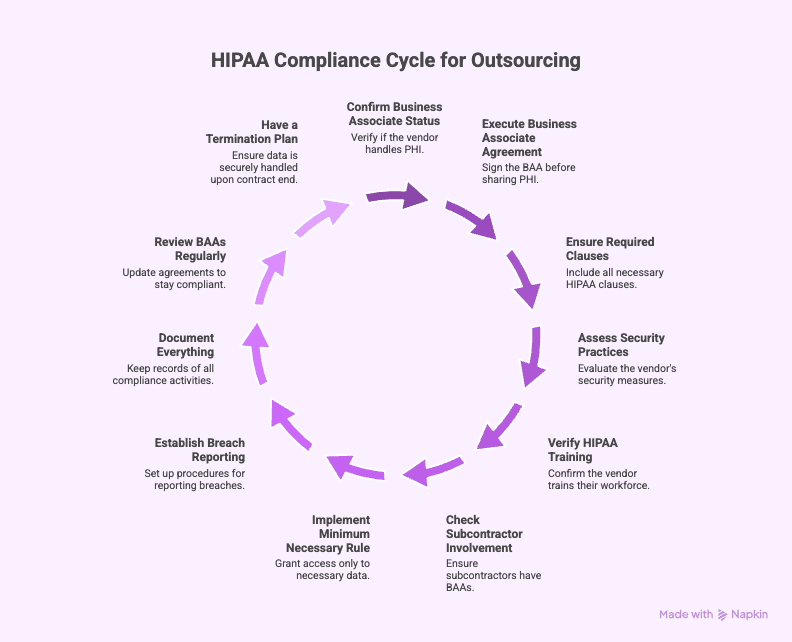
1. Confirm the Vendor Is a Business Associate
Before anything else, verify that the vendor will create, receive, maintain, or transmit PHI.
If yes, they are legally a Business Associate under HIPAA (per HHS guidance), and a HIPAA Business Associate Agreement is mandatory.
Red flag:
If the vendor says “we don’t need a BAA” while handling PHI.
2. Get a Signed BAA Before Sharing Any PHI
This is the number one violation OCR fines providers for.
A BAA must be fully executed before giving access to:
- EHR systems
- Patient scheduling platforms
- Billing data
- Voicemails or call logs
- Email inboxes containing PHI
No BAA means automatic HIPAA violation, even if a breach never occurs.
3. Make Sure the BAA Has the Required HIPAA Clauses
According to HHS and the 2013 Omnibus Rule, a compliant BAA must include:
- Permitted uses/disclosures of PHI
- Required administrative, physical, and technical safeguards
- Breach notification rules
- Minimum necessary standards
- Subcontractor requirements
- Return/destruction of PHI when the contract ends
- HHS access for audits
If these aren’t in the agreement, it’s not a valid HIPAA Business Associate Agreement.
4. Ask the Vendor About Their Security Practices
A BAA is not protection unless the vendor has real security in place.
Research-based minimum safeguards:
- Encrypted devices
- Secure login (no shared passwords)
- VPN or secure network use
- Multi-factor authentication
- Access logs
- No PHI on personal devices
- No unsecured apps (WhatsApp, Gmail, personal Dropbox)
OCR fines vendors who leave PHI unencrypted or on open servers.
5. Confirm the Vendor Trains Their Workforce on HIPAA
Most breaches happen because an employee makes a simple mistake.
A strong Business Associate should provide:
- HIPAA training
- Privacy awareness
- PHI handling rules
- Annual refresher training
If they can’t prove their training program exists, reconsider the partnership.
6. Check If Subcontractors Are Involved
If the vendor uses subcontractors, HIPAA requires:
- A downstream BAA for each subcontractor
- Same protections and restrictions as the primary BAA
This is where many providers get hit with fines.
7. Follow the Minimum Necessary Rule When Granting Access
Don’t give your virtual assistant full access if they don’t need it.
Examples:
- If they only do scheduling, don’t open their view to full patient charts
- If they take calls, restrict access to only the patient profile screen
- Use role-based permissions whenever possible
This reduces both risk and liability.
8. Establish Clear Breach Reporting Procedures
Your BAA should require the vendor to notify you of:
- Any unauthorized access
- Any accidental disclosure
- Any suspected or confirmed breach
OCR requires “without unreasonable delay”. Most BAAs set 24–72 hours.
9. Document Everything
Keep copies of:
- Signed BAAs
- Vendor security documentation
- Training attestations
- Access permissions
- Any incidents and follow-up actions
If OCR audits you, documentation is your best defense.
10. Review BAAs Regularly
Regulations change. Vendor operations change.
Update your BAA:
- Every 1–2 years
- Whenever new services are added
- Whenever a vendor changes its subcontractors
- Whenever HHS releases new enforcement guidance
Outdated BAAs caused multiple real-world penalties.
11. Have a Termination Plan
When the contract ends:
- Revoke all access
- Collect or verify deletion of PHI
- Get a written certification that data was destroyed
Many breaches occur after offboarding because access wasn’t shut down.
Final Thoughts

A strong BAA protects you, your patients, and your business. It’s not optional but essential.
If you’re using or considering a virtual medical assistant, make sure you’re covered. Ask about their policies. Insist on a signed HIPAA Business Associate Agreement. You’ll sleep better at night knowing you’re doing it by the book and protecting what matters most.
So yeah, outsourcing is awesome. Just make sure your BAA is locked in before you hit go.
Ready to outsource the right way?
If you want a virtual medical assistant who is already trained in HIPAA, uses secure systems, and signs a proper HIPAA Business Associate Agreement every time, HelpSquad can help. Our healthcare VAs support your practice while keeping PHI protected and your operations running smoothly. If you’re ready for compliant, reliable support, talk to us and we’ll walk you through exactly how outsourcing can work safely for your practice.
FAQ
Why do I need a Business Associate Agreement (BAA) when outsourcing?
A Business Associate Agreement is required under HIPAA anytime a service provider will access or handle Protected Health Information (PHI) on behalf of a Covered Entity. The BAA makes sure both parties follow proper privacy, security, and compliance standards. Without it, the Covered Entity is automatically out of compliance the moment PHI is shared.
What is a Covered Entity?
A Covered Entity is defined under HIPAA as a health plan, a healthcare clearinghouse, or a healthcare provider who sends or receives health information electronically as part of a HIPAA-regulated transaction. This includes everything from clinics and private practices to hospitals and billing departments.
What is a Business Associate?
A Business Associate is any person or organization that performs services for a Covered Entity and, as part of those services, will create, receive, maintain, or transmit PHI. Business Associates are not part of the Covered Entity’s workforce. Examples include virtual assistant services, medical billing companies, consultants, IT providers, call centers, and answering services.
Who should sign the BAA: the virtual assistant or the outsourcing provider?
The BAA must be signed between the Covered Entity and the outsourcing company providing the service. It should not be signed by an individual virtual assistant. An individual cannot take on organizational liability or guarantee HIPAA safeguards. The outsourcing provider is the one responsible for PHI security, staff training, breach reporting, and compliance.
The VA may sign a separate internal confidentiality or PHI-handling agreement, but that does not replace a proper BAA.
Do outsourcing providers typically supply a fully executed BAA?
A reputable healthcare outsourcing provider should always sign a formal Business Associate Agreement before any work begins. The BAA should cover PHI handling, security protocols, staff training, and breach notification requirements.
If a provider refuses to sign a BAA or asks you to sign one directly with an individual VA, that is a sign the service may not be following HIPAA requirements.

Maria, a BPO industry professional for a decade, transitioned to being a virtual assistant during the pandemic. Throughout her career, she has held various positions including Marketing Manager, Executive Assistant, Talent Acquisition Specialist, and Project Manager. Currently, she is a member of the marketing team as a Content Writer for HelpSquad. You may contact Maria on LinkedIn.