Virtual Care Coordinator: How They Improve Patient Communication and Practice Efficiency
21 May 2025 By: Michael Kansky
Updated

A virtual care coordinator helps your practice manage patient communication, appointments, and follow-ups efficiently, while freeing your in-house team to focus on care. Virtual patient coordinators can confirm visits, send medication reminders, check in after procedures, and guide patients through telehealth. Implementing a virtual care coordinator reduces no-shows, improves patient satisfaction, and ensures your practice runs smoothly. In this guide, we’ll explore how virtual patient coordinators transform clinical workflows and enhance patient care.
Key Tasks of a Virtual Patient Coordinator
What does a patient coordinator do? A Virtual Patient Coordinator connects patients with healthcare providers. They handle admin tasks that make patient visits smoother and faster. This role matters more now, as patients expect better service and faster help. Using tech, coordinators offer flexible, quick support for both patients and clinics.
Key Responsibilities and Functions of Virtual Patient Coordinator
A Virtual Patient Coordinator handles many important tasks. They’re like a helping hand, setting up appointments, sending kind reminders, and checking in to make sure patients feel supported every step of the way.
They also answer questions and share helpful info, building trust with each patient. They keep records updated and accurate, which supports better care and meets health rules.
Their work frees up doctors and staff to focus more on treating patients. They also share tips and resources, helping people understand their care and make smart health choices.
How Virtual Patient Care Coordinators Differ from Traditional Staff
Unlike in-office coordinators, virtual oneswork from home and use tech to stay in touch with patients and care teams. This lets clinics reach more people, no matter where they live. Many work part-time or by contract, which helps clinics save money.
Virtual coordinators know their way around digital tools. They handle tasks fast and adjust to new systems with ease. They’re also trained for telehealth, allowing them to guide patients through online visits, address technical concerns, and even support Reiki therapy sessions remotely when appropriate. This approach helps patients feel supported while keeping care smooth, personal, and accessible from anywhere
Benefits of Adding a Virtual Care Coordinator to Your Practice
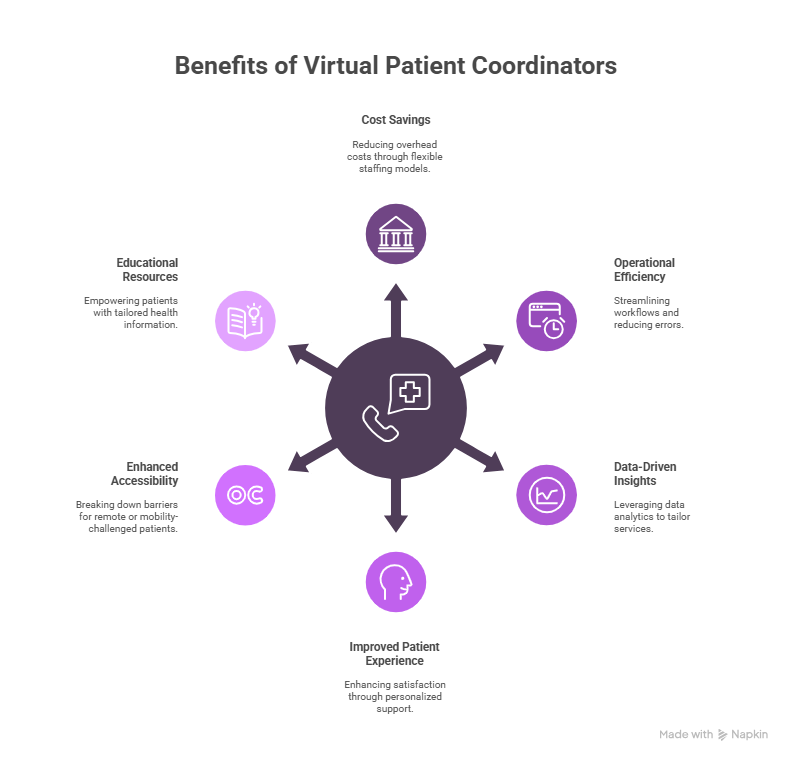
Adding a Virtual Patient Coordinator to a healthcare team brings big wins for both workflow and patient care. Knowing these perks helps clinics plan better.
Cost Savings and Operational Efficiency
One big reason to bring in a Virtual Patient Coordinator is to save money. Full-time staff means high costs for pay, benefits, and training. Virtual help offers flexible options that adjust with your needs.
They also boost efficiency. Virtual coordinators can handle tasks like reminders and follow-ups, freeing up time for real patient care. This reduces errors and speeds up daily work.
Plus, they use tech to track patient trends in real time. With this data, clinics can fine-tune services to better match patient needs. This keeps care sharp and helps practices stay ahead.
Improved Patient Experience and Satisfaction
Today, patient experience matters more than ever. A Virtual Patient Coordinator helps patients feel heard with fast replies and personal care. This builds trust and keeps them coming back. They also make care easier to reach. Patients can get help from home, great for those in remote spots or with mobility issues. This makes care more open to everyone.
On top of that, virtual coordinators share health info that fits each patient. They explain treatments, meds, and habits in simple ways. This helps patients stay on track and feel in control.
Benefits of Adding a Virtual Care Coordinator to Your Practice
Bringing in a Virtual Patient Coordinator takes some prep, but it pays off. With the right setup, the switch can feel smooth and even fun.
Pick tools that are simple and safe for patient data. Train your team well so they feel ready to use them. Guide your new coordinator, show them the ropes, answer questions, and let them shadow until they’re set.
Keep the team close. Use video calls, group chats, and shared notes to stay in sync, no matter the location. It might feel like a big shift at first. But once it clicks, you’ll wonder how you worked without one. They save time, cut stress, and help your team give better care to every patient.
Technology Requirements and Integration Considerations
Before adding a Virtual Patient Coordinator, check your tech. You’ll need good internet, safe chat apps, and easy tools to manage schedules. Cloud tools help your team stay connected, even if they work from different places. This keeps patient info and calendars up to date. Patient info must stay safe. Use trusted tools, train your team, and set clear rules. Add two-step logins and check systems often to build trust.
Pick tools that work with what you already use. If they connect to your EHR or billing system, things run smoother and faster. Test new tools first to fix any issues early.
Still asking why you need a virtual patient coordinator? Think about those busy days, phones ringing, patients waiting, things piling up. A coordinator helps with all that. They answer calls, set up visits, and take pressure off your team.
With a little training, they fit right in. They help your team work better and care more. It’s less about the tools and more about helping real people have a better, easier day.
Best Practices for Training and Transition
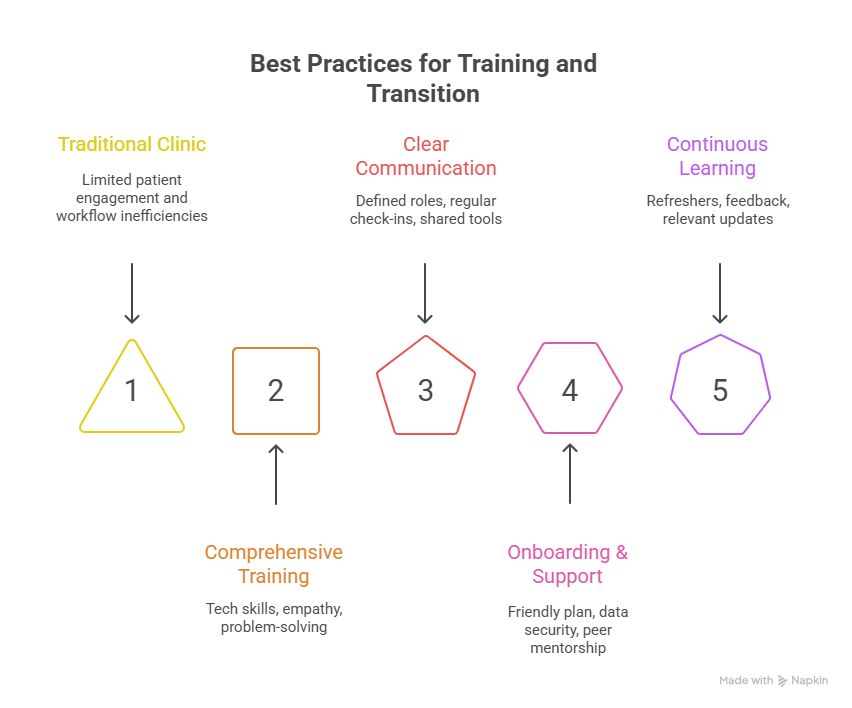
Training is key to making a Virtual Patient Coordinator work. Teach both tech and soft skills like empathy, listening, and problem-solving. Use role-play to prep for real talks. Clear lines between remote and on-site staff help things run smoothly. Regular check-ins keep everyone on the same page with care plans and tasks.
Shared digital tools let the whole team see patient notes and updates. This keeps workflows smooth and everyone in sync. As healthcare changes, adding a virtual patient coordinator helps clinics engage patients better and work smarter. With strong tech and training, care improves for all.
To build on this, start with a clear and friendly onboarding plan. Walk new team members through your systems, show them how to keep data safe, and explain how your team communicates and gets work done. Pair them with someone experienced so they can learn by doing and feel supported from day one.
Keep the lines open between remote and in-office staff. Use chat tools, shared boards, and video calls to stay in touch and share updates. This helps your virtual team feel connected and part of the group.
Training shouldn’t stop after the first week. Keep offering short refreshers on new tools, patient care tips, and privacy rules. Ask for feedback often to make sure your training stays helpful and relevant.
When you mix solid training with the right tools and a strong team spirit, your virtual coordinators and your whole practice can grow and thrive together.

Virtual Patient Coordinators for Telehealth Practices
As telehealth continues to grow in 2026, virtual patient coordinators have become essential for bridging the gap between digital platforms and human care. They act as a specialized “digital concierge” for patients navigating remote healthcare.
- Tech Troubleshooting: They assist patients with logging into portals and testing their video/audio before the doctor arrives.
- Pre-Visit Triage: Coordinators collect symptoms and confirm medical history virtually to save the physician time.
- Seamless Referrals: They electronically coordinate with specialists and labs to ensure telehealth patients get necessary follow-up care.
- Patient Education: Coordinators send digital guides on how to use remote monitoring devices (like smart blood pressure cuffs).
Case Study: Reducing No-Shows with a Virtual Care Coordinator
A mid-sized multi-specialty clinic faced a 25% no-show rate, leading to significant lost revenue and fragmented patient care. By implementing a dedicated virtual care coordinator, they transformed their attendance metrics within six months.
- The Problem: Automated “robo-calls” were being ignored, and patients often forgot their appointment details or had technical anxiety.
- The Solution: A virtual coordinator provided “high-touch” outreach, including a personal confirmation call 48 hours prior and a 15-minute tech-check for telehealth visits.
- The Results:
- No-Show Reduction: Dropped from 25% to 8% in the first quarter.
- Revenue Recovery: The clinic recovered approximately $120,000 in annual revenue previously lost to empty slots.
- Patient Satisfaction: NPS scores rose by 15 points as patients felt more supported and less “lost” in the system.
Step-by-Step Implementation Guide
Transitioning to a BPO-supported virtual coordinator model requires a structured approach to ensure data security and workflow integration.
- Needs Assessment: Identify which departments have the highest administrative burden or no-show rates.
- Vendor Vetting: Select a BPO partner with proven HIPAA compliance and experience in your specific EHR (Electronic Health Record) software.
- Define Access Controls: Set up “Minimum Necessary” sub-user permissions in your patient portal to protect sensitive data.
- Workflow Mapping: Create a clear flowchart of when the virtual coordinator contacts the patient (e.g., T-minus 48 hours for confirmation).
- Pilot Program: Launch the service with one department (e.g., Primary Care) for 30 days to refine the communication scripts.
- Full Scale-Up: Roll out the service clinic-wide once technical and communication bottlenecks are resolved.
- Continuous Monitoring: Review monthly “fill-rate” and “no-show” reports to measure ROI and adjust outreach strategies.
Frequently Asked Questions
What is a virtual patient care coordinator?
A remote worker who helps manage patient care, calls, and schedules.
What tasks do they handle?
They book visits, update records, follow up, and guide patients.
Can they work with my clinic’s system?
Yes, they use your software to keep records and workflows in sync.
Are virtual care coordinators trained?
Yes, most have healthcare training and know patient service basics.
Is patient data safe with them?
Yes, they follow HIPAA and use secure tools to protect all data.
How does a virtual care coordinator reduce no-shows?
They provide personalized appointment reminders, assist with technical troubleshooting for telehealth, and proactively resolve scheduling conflicts before they occur.
Can virtual patient coordinators work with my EHR system?
Yes, they are trained to securely access and update major Electronic Health Record (EHR) platforms via encrypted remote connections.
How quickly can a virtual care coordinator be implemented in a clinic?
Most clinics can successfully integrate a virtual coordinator within two to four weeks, depending on the complexity of the workflow and software permissions.
What is the difference between a virtual care coordinator and a medical assistant?
A virtual care coordinator focuses strictly on administrative and technical navigation, whereas a medical assistant typically performs hands-on clinical duties and in-person patient prep.
Trending Now
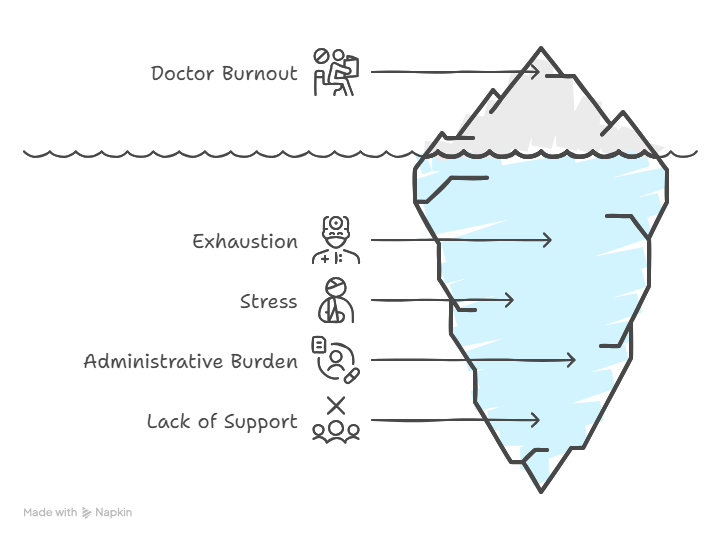
Doctors across the U.S. feel worn out not just by caring for patients, but by nonstop forms and red tape. Many miss family moments and carry heavy stress home. Electronic health records and insurance hurdles leave them drained, often spending more time clicking boxes than connecting with patients. While hospitals and groups try to help, their efforts barely scratch the surface. What doctors really need is to be heard—by their own leaders and lawmakers. Until that happens, burnout will keep stealing their joy, health, and purpose.
Using virtual patient coordinators is a smart way to solve staff shortages and keep care strong. If you’re wondering why you need virtual patient coordinators, the answer is simple, they take care of the busy work so your team can focus on patients.
Want to improve how your clinic runs and treats patients? HelpSquad Health is here to help. Our trained virtual assistants and 24/7 support team handle admin tasks and patient care. Prices start at just $8.50 per hour.
Don’t wait! Start your trial today and see how HelpSquad can boost your clinic’s success.

Michael Kansky, Founder of LiveHelpNow and HelpSquad, has leveraged his 20 years of industry experience and innovative support strategies to revolutionize customer service approaches, making LiveHelpNow a leading customer service software provider, and establishing HelpSquad as a bridge between businesses and customer needs. You may contact Michael on LinkedIn: https://www.linkedin.com/in/mkansky/