Automated Customer Service Solutions | 24/7 AI Support
18 Feb 2025 By: Maria Rush
Updated
Automated customer service helps businesses respond instantly to customer inquiries while reducing operational costs and improving efficiency. HelpSquad’s AI-powered solutions provide 24/7 support across chat, email, and voice, handling repetitive requests, FAQs, and routine service tasks. By automating customer service, companies can focus human agents on complex issues, improve customer satisfaction, and maintain operational consistency.
What Is Automated Customer Service?
When a business develops and patient requests change, the classic customer care systems usually can not cope with the changing customer journey. The automation of customer care is not a passing fancy but rather a strategy that has been successfully implemented and that resolves the major issues reported by support teams.
The Evolution of Customer Support
In the past, customer service relied mostly on people, who would handle the calls and emails within certain hours. Nevertheless, the internet and global market expansion have caused customers’ expectations to change radically. Modern buyers expect support round the clock and quick replies as their first choice. This has led to the need for new and innovative customer service automation solutions.
Chatbots, AI, and machine learning have revolutionized the relationships between businesses and their customers. This enables the smoother and faster experience. The mentioned technologies instantly provide the answers to the frequently asked questions and learn from the interactions, thus ensuring their constant improvement through time.
The Demand for 24/7 Availability
Customers expect support outside of conventional business hours. If they are at entirely different times or just operating rounds day through to be available 24/7. This can boost fickle capacity customer satisfaction in a big way.
Automated customer support systems can guarantee that customers will be able to get help at any time they contact. Thus, the elimination of the annoying situation and the cutting down of the waiting time. This promptness creates a good customer experience, which in turn leads to more brand loyalty. Moreover,61% of those surveyed consider 24/7 customer service companies as the main advantage of chatbots.
What are the Challenge of Overhead Costs?
Operating a customer support team around the clock can quickly become expensive. Staffing a support center 24/7 incurs significant costs in wages, training, and benefits. Additionally, high turnover rates in support staff can exacerbate these customer service tasks. Resulting in further inefficiencies.
Automation presents a pragmatic solution that enhances availability. It also reduces the overhead associated with traditional support methods. AI can decrease customer service expenses by up to 30%.
Trending Now
Automation powered by AI is transforming customer support. Retailers are able to deal with the increased demand during peak seasons while still maintaining quality of service. AI does not burden the staff but handles the routine tasks instead. It deals with updates on the orders, checks on inventory, and questions from customers that are common. This results in fewer errors, quicker replies, and more satisfied customers.
Predictive analytics helps smaller teams focus on what matters. Even new support agents can provide accurate answers with real-time AI guidance. Shoppers expect more transparency, especially with returns and deliveries. Automation keeps them updated before they even have to ask.
Customer care gets a boost with the appropriate combination of AI and human support. To facilitate smooth operation of these AI-powered processes, enterprises trust to an AI driven test automation solution to discover possible problems that might raise customer interaction. This strategy enables businesses to remain competitive and flexible during the market’s rapid changes.

How Automated Customer Support Works?

Different businesses have different needs, which is why customer service automation platforms come in various forms. A well-implemented automated customer support system can include AI-powered chatbots that handle common inquiries, automated ticketing tools that route issues to the right team, self-service knowledge bases that empower customers to find answers on their own, and omnichannel platforms that unify communication across email, chat, and social media.
When these components work together, businesses can deliver faster, more consistent support while freeing up human agents to focus on complex, high-value interactions.
What is Chatbots and AI Assistants?
Chatbots are one of the most popular automated software for customer support. They are capable of giving answers to the most common inquiries, helping customers to cope with their issues, and even doing the payment processing. The implementation of AI-powered automation has cut the waiting time in call centers by 40%.
Automated Email and SMS Responses
Customer service automated responses ensure no customer issue goes unanswered. Companies integrating AI with human agents handle 7.7% more simultaneous chats, leading to an average staffing cost savings of $4.3 million.
Self-Service Knowledge Bases
A well-structured FAQ or help center is an underrated yet powerful form of automation in real time customer service. Customers can find answers themselves, reducing the workload on human agents.
IVR (Interactive Voice Response) Systems
IVR is a classic automated customer service system that helps route calls to the right department. It can also provide information without human intervention.
CRM and AI Integration
For businesses that use automated customer service software. Integrating AI with customer relationship management (CRM) tools can provide real-time insights and personalized experiences.
Automated Customer Service Examples in Real World Businesses
Still not convinced? Here are some customer service automation examples that show how businesses are using technology to enhance support:
- E-commerce: Amazon’s chatbots handle order tracking and returns.
- Banking: Many banks use AI-driven assistants to help customers check balances, transfer funds, and even dispute transactions.
- Healthcare: Clinics and hospitals leverage automation for appointment scheduling, prescription refills, and handling basic customer inquiries. More than 60% of consumers expect 24/7 service availability.
- Hospitality: Hotels implement AI-powered concierge services that handle guest inquiries, room service requests, and check-in/check-out processes.
Choosing the Right Automated Customer Support System
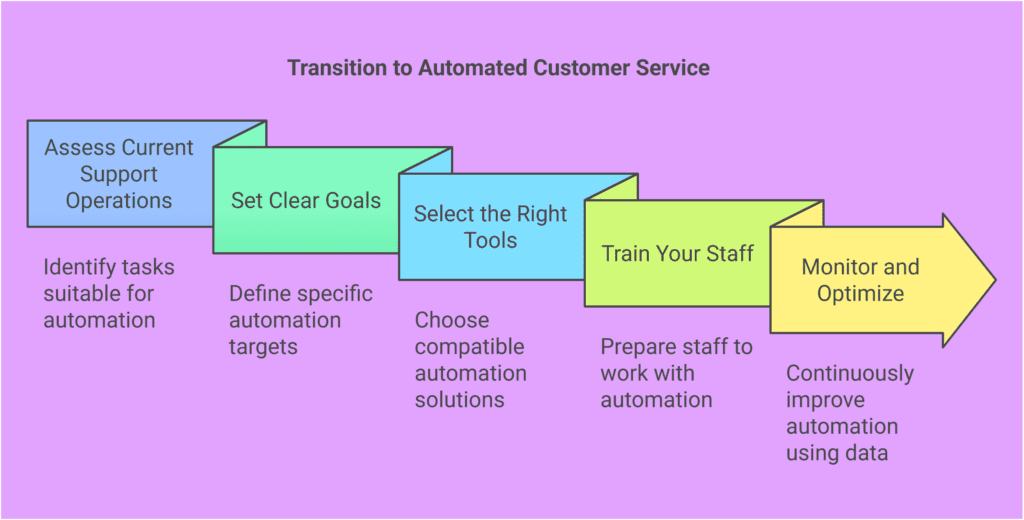
Steps to Transition to Automated Customer Service
- Assess Current Support Operations – Identify high-volume or repetitive tasks where automation can have a significant impact.
- Set Clear Goals – Define specific targets. Whether it’s reducing response times, lessening the burden on staff, or improving customer satisfaction.
- Select the Right Tools – Ensure the automation solutions integrate with your existing systems and align with your business needs.
- Train Your Staff – Human agents should be well-versed in working alongside automation to provide seamless customer experiences.
- Monitor and Optimize – Use data-driven insights to continuously refine automated responses and customer interactions.
Benefits of Automating Customer Service
Key Performance Indicators for Automated Customer Service
- First Response Time – Measures how quickly a customer receives their first answer.
- Resolution Rate – The percentage of queries resolved without human intervention.
- Customer Satisfaction Scores – The surveys deliver important insights which show how customers interact with automated systems. A cloud-based customer experience platform can enhance this process by seamlessly collecting, analyzing, and interpreting feedback in real time. The insights assist businesses to develop better automation systems which provide clients with more personalized experiences and improved service delivery.
- Cost Savings – Quantifying the reduction in operational costs due to automation.
Conclusion
Customers want fast, efficient, and smart customer service 24/7 chat. The best way to deliver that without increasing overhead costs? Customer service automation. It is not the issue of human agents being replaced, but rather the issue of empowering them. Companies that automate menial work will be able to direct their employees toward more sophisticated and valuable customer relationships. This is the winning strategy in the current competitive market.
“When deploying AI, whether you focus on top-line growth or bottom-line profitability, start with the customer and work backward.”
— Rob Garf, Vice President and General Manager, Salesforce Retail
Ready to transform your customer support with the power of automation? Look no further than HelpSquad BPO. Our dedicated virtual assistants and 24/7 customer service team are here to elevate your business operations, offering bilingual support and a range of outsourcing services at an unbeatable starting rate of just $8.50 per hour. The chance to improve your customer satisfaction and make your support system more efficient is available to you. Start your trial today and experience the efficiency that HelpSquad BPO can bring to your company.
What is automated customer service?
Automated customer service uses technology—like chatbots, AI assistants, automated email/SMS replies, self-service knowledge bases, and IVR systems, to answer questions, route requests, and resolve common issues without needing a human agent for every interaction.
Why are businesses turning to customer support automation now?
Because customers expect fast responses and 24/7 availability. Traditional support teams often can’t keep up as volume grows, and staffing around the clock is expensive. Automation helps reduce wait times, improve consistency, and scale support without matching headcount 1:1.
Does automated customer support replace human agents?
Not if it’s implemented well. The goal is to automate repetitive, high-volume tasks (like order updates, FAQs, and basic troubleshooting) so human agents can focus on complex, sensitive, or high-value cases that need judgment and empathy.
What are the biggest benefits of automating customer support?
Key benefits include faster first response times, round-the-clock support, reduced overhead costs, fewer missed messages, improved consistency in answers, and the ability to handle spikes in demand without overwhelming staff.
What types of customer support tasks are best suited for automation?
Automation works best for predictable and repetitive requests, such as FAQs, order status updates, returns policies, appointment scheduling, password resets, basic troubleshooting steps, and routing customers to the right department or resource.

Maria, a BPO industry professional for a decade, transitioned to being a virtual assistant during the pandemic. Throughout her career, she has held various positions including Marketing Manager, Executive Assistant, Talent Acquisition Specialist, and Project Manager. Currently, she is a member of the marketing team as a Content Writer for HelpSquad. You may contact Maria on LinkedIn.